Apple adds Siri Recaps and Audio Intelligence to iOS developer betas
Apple has introduced new AI audio features like Siri Recaps and Live Rewind in the latest iOS and watchOS developer betas, raising privacy debates.
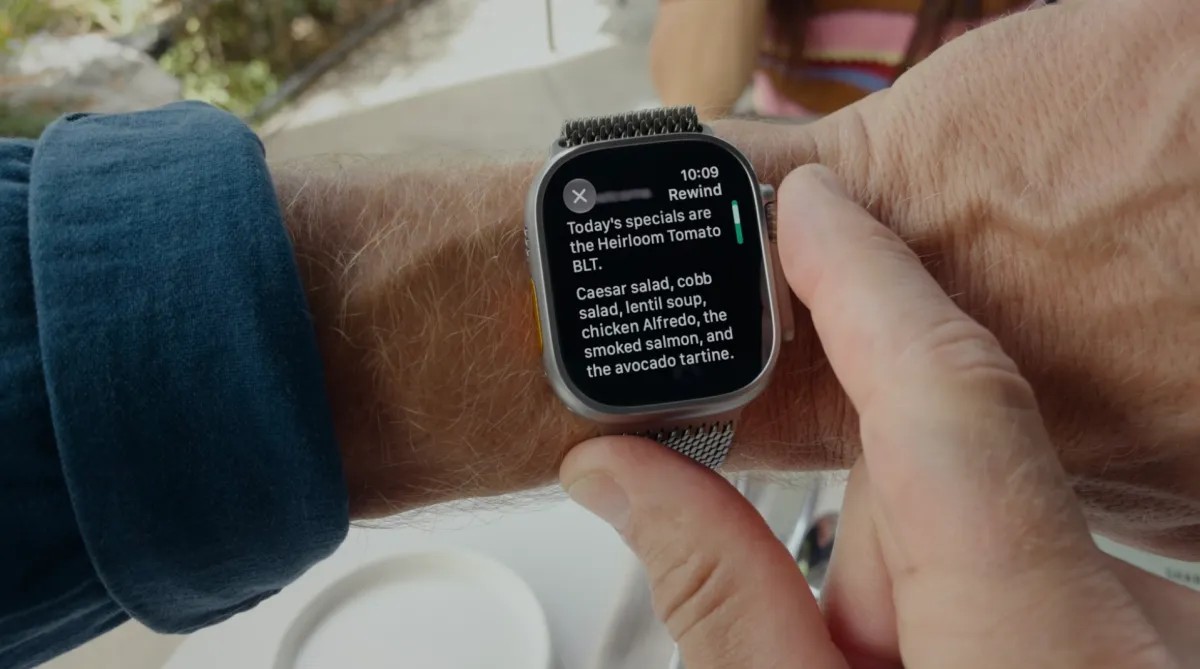
Apple has rolled out a set of Audio Intelligence features into testing with the first developer beta versions of iOS and watchOS. The updates bring four new AI-powered capabilities that allow Apple Watch wearers to detect important sounds, identify songs, review conversations, and automatically take notes.
- New features include sound and song detection, 15-second audio rewind, and AI-powered daily conversation summaries.
- Siri Recaps and Live Rewind have sparked privacy debates regarding continuous audio recording and automated note-taking.
- Apple processes audio and runs AI models on-device whenever possible without storing raw audio files or identifying speakers.
New Audio Intelligence Features on Apple Watch
The first two features, sound and song detection, do not raise significant privacy concerns as they focus on safety alarms or identifying music via Shazam technology. However, Live Rewind and Siri Recaps have drawn scrutiny because they record and summarize conversations happening around the Apple Watch owner throughout the day.
Live Rewind lets users replay the past 15 seconds of audio, while Siri Recaps aggregate important details from daily conversations. Apple addresses privacy by avoiding speaker identification, not storing raw audio recordings, redacting sensitive personal information, and running models locally on the device when feasible.
Read alsoApple Siri AI Waitlist Now Limited to Times of High DemandReal-World Experience with Siri Recaps
Testing the Siri Recaps feature in everyday scenarios demonstrates its practical value, especially when dealing with fast-paced verbal information. For example, during car repairs or rental pickups, the AI successfully captures crucial details like timeframes, costs, and policies without requiring manual note-taking.
At the same time, the feature is not without flaws. It often mixes essential information with casual household chatter, errands, or television viewing habits. This blending of personal moments with functional notes can sometimes feel intrusive, prompting users to consider turning off the feature while at home.
Potential Improvements and Future Outlook
To improve user experience, several enhancements are desired, such as the ability to easily swipe away irrelevant bullet points, automatically organize notes into separate categories, and instantly export saved recaps to Apple's Notes app. Despite privacy hesitations, automated note-taking highlights a shift toward more proactive AI integration in everyday devices.
Source: TechCrunch