Apple News Live Activity: Track US Midterm Election Results Live
Learn how to use Live Activities in Apple News and iPhone Mirroring on Mac to track US midterm election results in real-time right from your screen.
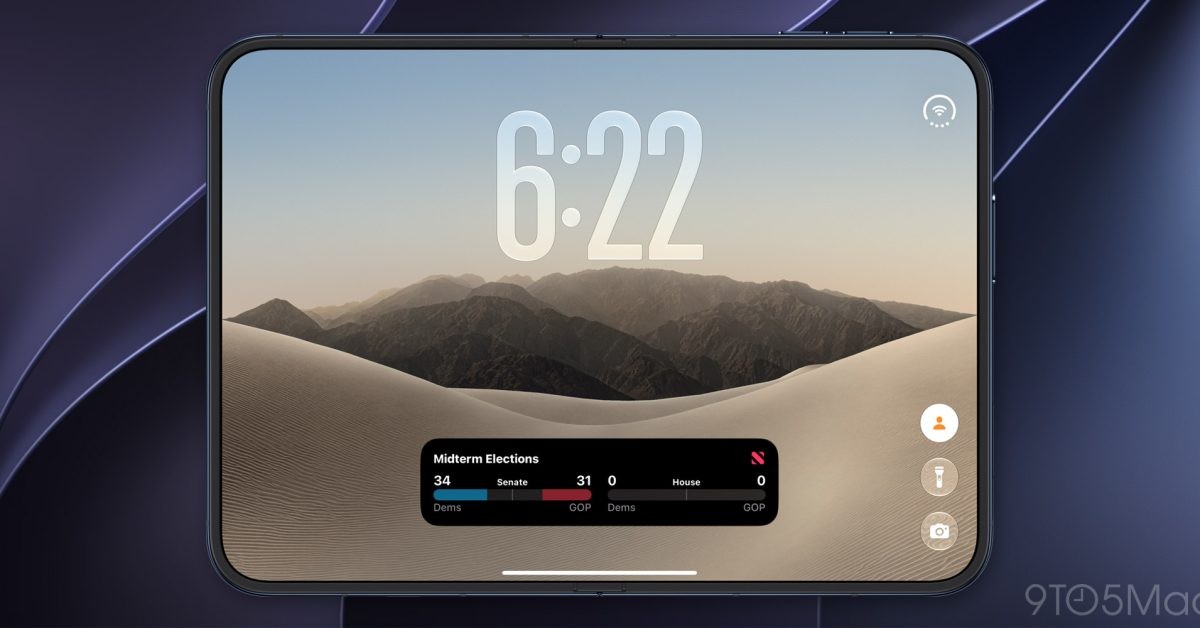
With votes being counted in the US midterm elections, the Apple News app offers a convenient way to follow the results in real time. The platform provides seamless tracking options for users looking to stay updated.
- All 435 seats in the House of Representatives and 35 Senate seats are up for election
- Live Activities deliver real-time updates directly to the Lock Screen and Dynamic Island
- Mac integration via iPhone Mirroring in macOS Tahoe 26 allows desktop tracking
How Election Live Activities Work
On Election Day in the United States, users can open the Apple News app and tap on the 'Follow the 2026 midterms live' banner at the top of the screen. This enables continuous updates throughout the evening as vote counts progress.
Once enabled, the Live Activity displays election results as they become available directly on your iPhone's Lock Screen and, on supported models, within the Dynamic Island. This allows you to follow the elections while multitasking across other apps.
Read alsoApple Music Adds Selfie Sing Karaoke Feature in iOS 27.3 UpdateMac Integration and Apple Ecosystem
For users who prefer tracking results on their computers, Live Activities from an iPhone can also appear in a Mac's menu bar through iPhone Mirroring. This feature was introduced in macOS Tahoe 26 to bridge mobile and desktop workflows.
Additionally, users can open the Apple News application directly for broader coverage, expert analysis, and deep-dive reporting regarding the 2026 midterm elections.
What This Means for Users
Integrating real-time political tracking into the native Apple News app highlights the strength of the company's ecosystem. By combining Live Activities with cross-device mirroring, users get instant, frictionless access to major breaking events without opening multiple apps.
Source: 9to5Mac