Samsung DeX: How to turn your Galaxy phone into a desktop PC
Discover how Samsung DeX transforms your Galaxy smartphone into a desktop computer with windowed apps, a taskbar, and monitor support.
·2 min read
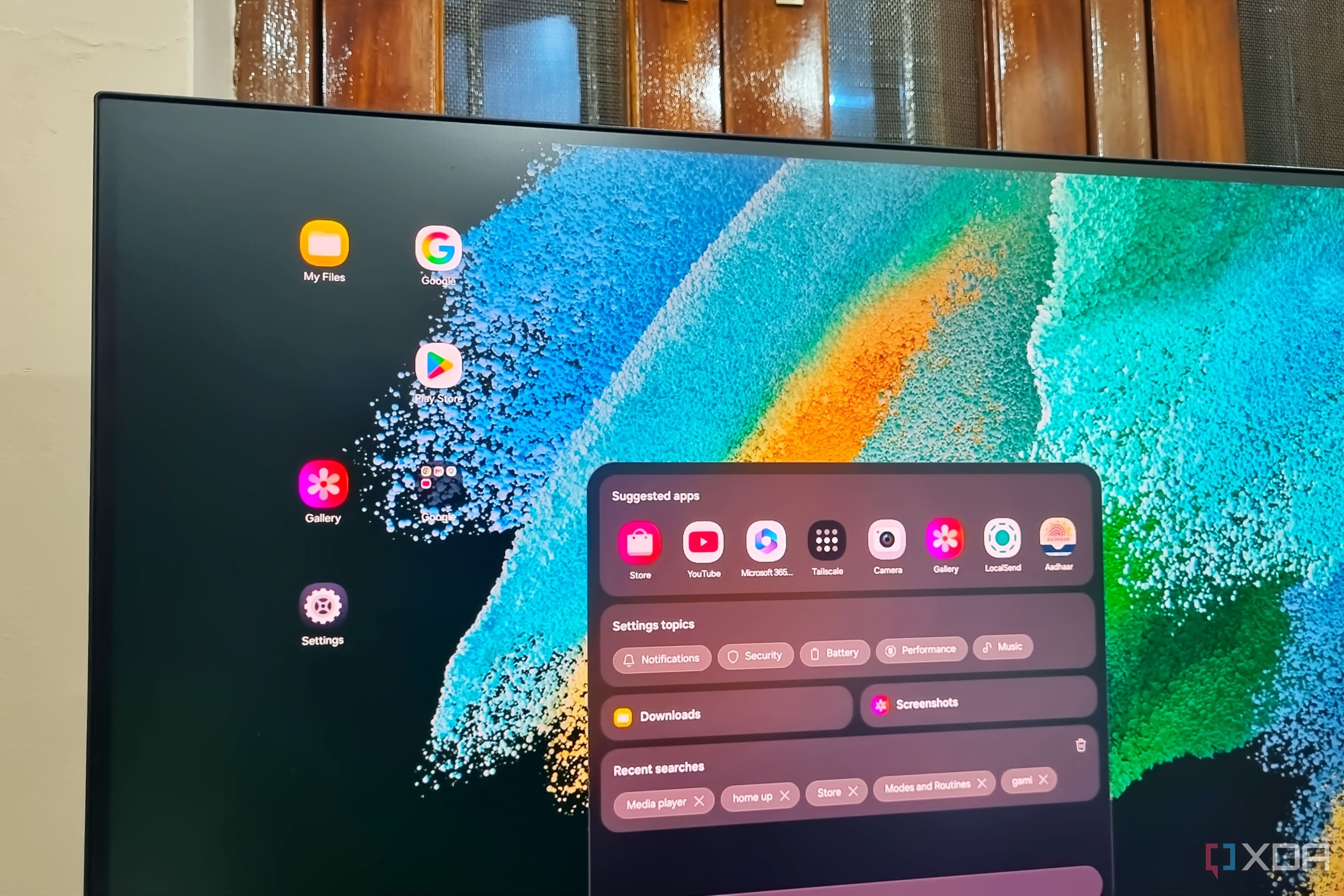
Smartphones rarely try to step into personal computer territory, as manufacturers focus primarily on hardware specifications, displays, and batteries. However, Samsung has been developing its desktop experience called DeX for many years, starting with the Galaxy S8 series. Despite its utility, a surprisingly large number of Galaxy phone owners have never actually connected their devices to an external monitor.
Key highlights about Samsung DeX - Replicates a traditional desktop environment with windowed apps and a taskbar. - Supports both wireless connections and wired setups using affordable USB-C hubs. - Fully optimized for popular productivity tools like Chrome, Gmail, and Google Docs. - Enables efficient multitasking with side-by-side app windows on a large display.
Interface design and app adaptability DeX mode aims to recreate a familiar desktop layout resembling Windows or Linux. The bottom right corner houses quick settings and notifications, the center features the app launcher, and the left corner contains navigation buttons. Users can customize wallpapers and adjust the workspace to fit their personal preferences easily. The real strength of DeX lies in how well applications adapt to the extended screen space. Major web browsers, Microsoft Office, and Google Docs utilize the large display smoothly without awkward stretching. For instance, Gmail allows users to read emails on one side while composing a reply on the other, greatly boosting everyday productivity.
Hardware requirements and connection setup Because Galaxy phones lack a physical HDMI port, connecting to a monitor requires a USB Type-C to HDMI hub equipped with power delivery pass-through. A simple adapter priced around $10 solves the connection issue while allowing users to plug in a wired or wireless keyboard and mouse. Older accessories like the DeX Pad are outdated and incompatible with modern models, making a multi-port USB-C hub the best practical choice. Setting up the environment takes minimal effort and a modest budget. Whether you want a clean permanent desk setup or a portable workstation for travel, the hardware requirements remain simple and widely accessible.
Real-world applications and user benefits DeX is extremely useful when you need to handle urgent work tasks, check emails, or join video calls on a bigger screen while away from your primary computer. It also breathes new life into older Galaxy smartphones, allowing them to serve as lightweight media centers for streaming YouTube or playing casual games. For users in various regions looking for a cost-effective computing solution, DeX can act as a secondary computer for family members or students. By utilizing the processing power of a smartphone you already own, you can avoid buying a separate entry-level PC while enjoying a seamless desktop experience.
Source: XDA