Windows Baseline Protection: Microsoft security system and app blocking
Microsoft tests Windows Baseline Protection, combining OS security features. Developers will be able to block apps on unprotected PCs.
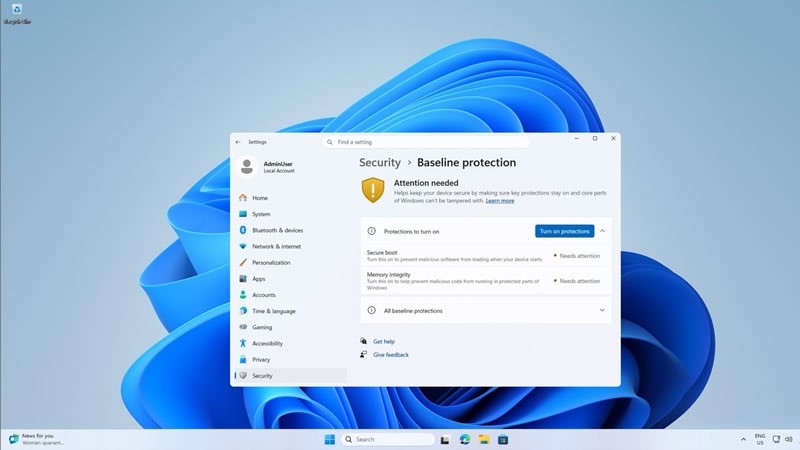
Microsoft is currently testing a new system called Windows Baseline Protection, designed to combine eight existing Windows 11 security mechanisms into a unified verification framework. This system will allow third-party developers to check the security level of user computers before allowing their software to run.
- The system integrates eight security mechanisms of Windows 11 into a single check.
- Third-party developers can request verification results or hardware tokens.
- Adobe, Blizzard, and 1Password have already joined the testing phase.
- A full rollout of the new feature is scheduled for 2027.
How Windows Baseline Protection Works
The new architecture allows developers to request a simple verification result, a detailed list of missing security components, or a special hardware confirmation token from Windows. The latter option is harder to fake because its authenticity can be verified on the developer's servers.
At the same time, Microsoft will not block applications on its own: companies will be able to display warnings, disable certain features, or completely prohibit the launch of programs that do not meet their security standards.
Read alsoMicrosoft prepares to turn Android devices into a second Windows 11 screenFirst Partners and Use Cases
Major industry players have already joined the testing phase, including Adobe, Blizzard with its Battle.net platform, 1Password, Raycast, and the educational service Schoolyear. The latter, for instance, uses the check to ensure students' computers meet security requirements before exams begin.
Neither Adobe nor Blizzard has yet announced intentions to block their software on computers that fail the check. However, the tool gives developers granular control over the execution environment of their applications.
Challenges for Gamers and Enthusiasts
The new feature may create additional hurdles for gamers and enthusiasts who disable certain security mechanisms to boost performance or hardware compatibility. For instance, disabling Memory Integrity can improve speed in some scenarios, while Secure Boot is often deactivated when configuring multi-boot systems with Linux.
Such modifications may now result in licensed applications refusing to work altogether. To manage these new parameters, Microsoft will add a dedicated Baseline Protection page to the Windows 11 settings.
Management and Implementation Timeline
The settings page will show which security mechanisms are enabled and which require attention, allowing users to activate available features with a single click followed by a reboot. Enabling Secure Boot will require navigating UEFI settings, with Windows providing step-by-step instructions and a QR code.
Currently, the feature is available to Windows Insider program participants, with its full-scale rollout planned for 2027. This gives the ecosystem ample time to adapt to the upcoming security enhancements.
Source: 3DNews: