Windows 11 is secretly tracking coding agents and developer tools usage
A new investigation reveals that Windows 11 monitors the usage of AI coding agents and developer tools, sending telemetry data to Microsoft.
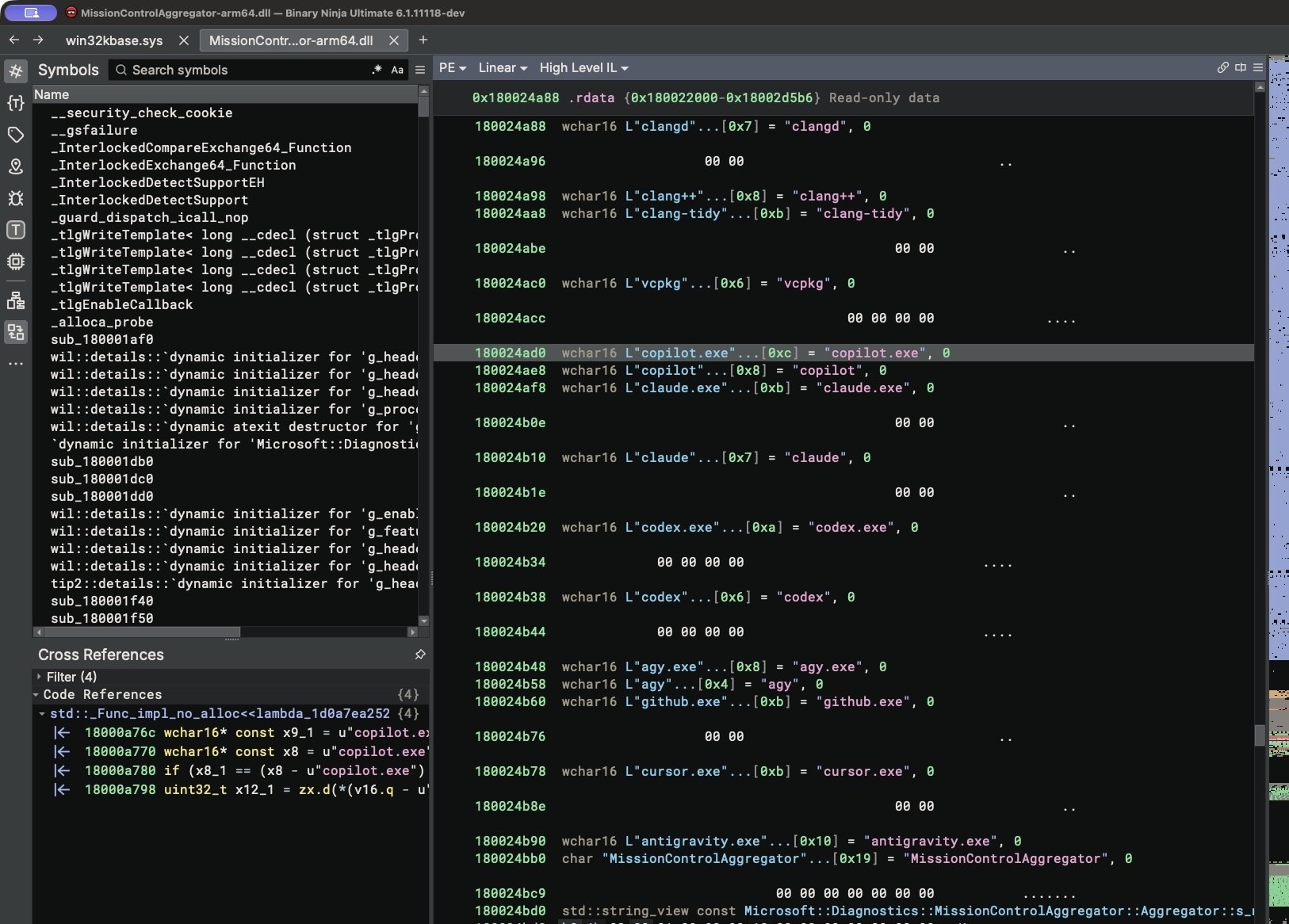
Recent analysis of Windows 11 binary files has uncovered a built-in system component that tracks which developer tools and AI coding agents are being executed. Security researchers found that the operating system logs the usage of utilities like Python, Node.js, and popular coding assistants.
- MissionControlAggregator.dll monitors specific executable names and developer environments.
- Tracked tools include copilot.exe, claude.exe, codex.exe, cursor.exe, python.exe, and gcc.exe.
- Collected data is converted into bitsets and transmitted via the DiagTrack diagnostic service.
- The tracking relies on an experimental feature flag named CLICodingAgentUsage.
How Windows 11 Detects Developer Tools
The investigation into MissionControlAggregator.dll revealed hardcoded execution checks targeting both command-line agents and desktop applications, including workloads running via WSL. The system checks for specific slots matching AI coding assistants as well as traditional compilers, debuggers, and frameworks such as Node.js, .NET, and Visual Studio.
To gather this data, the component hooks into existing Windows event providers like KernelProcess and Win32kTraceLogging. When a targeted tool is launched, the component registers the event, updates its internal state, and generates a Segments.SubCohorts report. Rather than transmitting raw executable names, the system uses a bitmap representing broader tool categories.
Read alsoMicrosoft prepares to turn Android devices into a second Windows 11 screenInvestigation and Practical Verification
Testing on a Windows 11 ARM64 virtual machine demonstrated that the CLICodingAgentUsage feature was already active as a service experiment by default. Simply renaming a command-line prompt copy to codex.exe or gcc.exe was enough for the system component to recognize and log the execution.
The DiagTrack telemetry service collects these events using Event Tracing for Windows (ETW). If optional diagnostic data sharing is enabled—which is the default on standard consumer installations—this telemetry is uploaded to Microsoft servers. The generated reports do not contain source code or prompt text, focusing entirely on tool usage categorization.
Privacy Implications for Developers
While Microsoft frames such telemetry as a mechanism to improve system performance and user experience, the detailed tracking of professional development tools raises privacy concerns. Developers frequently rely on specialized environments, and telemetry monitoring specific AI agent categories highlights ongoing debates surrounding operating system surveillance.
For developers and tech professionals, this discovery underscores the importance of auditing operating system telemetry and privacy settings. Reviewing optional diagnostic data permissions ensures greater control over what system usage metrics are shared with third-party servers.
Source: Hacker News: Front Page